
April 14, 2026
AI Automation for Small Business: A Practical How‑To Guide 2026

AI automation for small business is no longer a buzzword. It’s a real way to shave hours off your day and keep cash flowing. In this guide we walk you through every step you need to set up, run, and grow AI‑driven workflows. You’ll see how to pick tools, build a first workflow, watch the results, and scale without blowing your budget.
We start with a quick look at the data that backs our advice, then dive into five practical steps you can take today. By the end you’ll know exactly what to automate, which tool fits your team, and how to keep the system humming.
The research team queried terms such as “AI workflow automation for small business,” scraped 68 web pages, extracted data from 5 YouTube video descriptions and 2 direct‑crawl API docs on April 13 2026, and captured each platform’s AI capability level, integration count, free‑tier options, notable limitations and primary industry fit for comparison. Sample size: 13 items analyzed.
Comparison of 10 AI‑driven automation platforms, April 2026 | Data from 6 sources | ||||||||
Name | AI Capability Level | Key Automation Features | Native Integrations Count | Free Tier Available | Notable Limitations | Primary Industry Fit | Best For | Source |
|---|---|---|---|---|---|---|---|---|
BCJ Managed AI Workflow Automation (Our Pick) | Advanced | lead capture; payment reminders; employee tracking; social media posting; custom AI agents | — | No free tier | Implementation typically takes 1–2 weeks and requires BCJ to handle setup | restaurants, contractors, agencies | Best for custom AI agents & industry‑specific workflows | |
Make | basic AI features; no native eval/versioning for model changes | Powerful routers, iterators, and granular data transforms; Economical for high‑throughput scenarios; Solid error handling and replay; Visual debugger for complex flows | 3,000+ app integrations | Free tier; paid plans from $9/month | UI can feel heavy for simple tasks; AI‑specific features are basic with no native eval/versioning | — | Best for high‑throughput cost efficiency | vellum.ai |
Pipedream | AI agents creation and deployment | Native coding experience with NPM support; Excellent for webhooks, streaming events, API mashups; Strong logging, secret management, step‑by‑step introspection; Good for automations requiring custom code | 3,000+ | Free tier; paid plans from $29/month | Not ideal for non‑technical builders; smaller connector catalog than Zapier or Make | — | Best for developer‑centric code‑first automations | vellum.ai |
Zapier | basic AI steps and natural language triggers | Huge connector catalog with easy onboarding; AI actions (summarize, classify) plug into existing zaps; Reliable for webhook‑driven single‑purpose tasks; Strong community templates for quick wins | Thousands of app integrations | Free tier; paid from $20/month | Limited for complex AI orchestration: no native evaluations/versioning; costs can climb with high‑volume or premium apps | Small businesses and non‑technical teams needing multi‑SaaS automation | Best for massive connector catalog | vellum.ai |
Celigo | — | over 1,000 prebuilt connectors; connect cloud apps; automate workflows | over 1,000 prebuilt connectors | — | — | Mid-sized to large businesses with complex integration needs across multiple cloud applications and departments. | Best for prebuilt connector volume | |
n8n | Native AI integrations including LLM and agent support | 300+ integrations with open‑source ecosystem; Fully self‑hostable (Docker/Kubernetes); Extensible via custom JavaScript nodes and APIs; Ideal when data cannot leave your environment | 300+ integrations | Free open-source; cloud plans start around $20/mo | Governance/observability require more DIY; less approachable for non‑technical users without enablement | technical teams | Best for self‑hosted open‑source control | vellum.ai |
Microsoft Power Automate | AI Builder provides forms, classification, and extraction | Deep integrations with Microsoft 365, Dynamics, Teams, Azure; Built‑in governance, connectors, approval patterns; Hybrid cloud + desktop RPA; AI Builder for forms, classification, extraction | — | Free trial; paid from $15/month | Licensing and SKU selection can be complex; non‑Microsoft connectors sometimes lag in depth | — | Best for Microsoft ecosystem integration | vellum.ai |
Workato | AI‑powered automation suggestions | Enterprise‑grade automation and orchestration; low‑code recipe builder; API management; audit logs and security controls | — | — | Custom pricing makes cost assessment harder; Overkill for teams without complex enterprise integration needs; Not available for self‑service trial | — | Best for enterprise‑grade governance | airtable.com |
Boomi Flow | AI‑supported automation | visual design interface; dynamic workflows; mobile app deployment | — | — | — | enterprises | Best for mobile‑first workflow deployment | |
FlowForma | AI‑assisted workflow creation | drag‑and‑drop form builder; built‑in analytics; AI‑powered process creation via FlowForma Copilot; mobile app access | — | — | — | compliance‑focused organizations | Best for compliance‑focused low‑code process creation |
That table shows why we keep saying “pick the tool that fits, not the one with the most connectors.” Make and Pipedream list thousands of apps, but they only give basic AI. Our pick, BCJ Managed AI Workflow Automation, is the only platform rated ‘Advanced’ and it even builds custom AI agents for your industry.
Table of Contents
Step 1: Identify Repetitive Tasks to Automate
Step 2: Choose the Right AI Tools for Your Needs
Step 3: Set Up and Integrate AI Automation
Step 4: Create a Simple Automation Workflow
Step 5: Monitor, Optimize, and Scale Automation
Conclusion
Step 1: Identify Repetitive Tasks to Automate
First, look at the chores that eat up time every week. Ask yourself: which jobs need a human eye every day, and which could run on a script? Most small teams find three big buckets.
Administrative chores. Think of calendar entry, invoice logging, or routing a purchase order. The U.S. Chamber study notes that nearly 55% of workers spend five or more hours a week on these dull tasks.U.S. Chamber on AI tools for small businessshows how AI can handle data entry, approvals, and notifications without a break.
Customer‑facing chores. Chatbots, email replies, or follow‑up reminders often sit idle in an inbox. Moveworks points out that 99% of Americans already use AI products weekly, often without noticing.Moveworks on AI automation exampleslists real‑world gains like cutting support calls by 30%.
Finance chores. Bookkeeping, expense matching, and payroll checks are prime candidates. The same Chamber article says 86% of accounting tasks could be automated. If you can pull data from receipts and match it to a ledger, you save hours and avoid errors.
Write down each task on a sticky note. Then ask: how often does it repeat? How many clicks does it need? The more repetitive and rule‑based, the better the fit for AI automation for small business.
Next, rank the tasks by impact. A task that costs you $200 a week in labor is higher priority than a $20‑a‑week email reminder. Use a simple score: Frequency (1‑5) × Pain (1‑5). The highest scores become your first automation pilots.
And remember: you don’t need a fancy platform to start. Even a free Zapier zap can move data from a web form into a Google Sheet and send you a Slack alert. That’s a tiny win that proves the concept.
Step 2: Choose the Right AI Tools for Your Needs
Now that you know what to automate, pick a tool that matches your skill level and budget. The research table tells us that many tools boast thousands of connectors, but only a few give true AI depth.
If you want a no‑code canvas and visual debugging, Make is a solid pick. It lets you drag nodes, set conditions, and run loops. Airtable’s AI workflow guide notes that visual builders help non‑tech teams see the flow at a glance.
If you prefer a tool that lives inside a spreadsheet‑like view, Airtable itself blends a database with AI agents. It can auto‑enrich records, classify emails, and even write short drafts. The same guide lists Airtable’s AI agents as a way to run background processes without writing code.
For teams that already love chat‑first collaboration, Missive adds AI drafts, sentiment detection, and routing rules right inside the inbox.Missive’s roundup of AI tools for small businesshighlights how AI rules can flag angry emails and assign them to senior staff.
When you compare features, keep three things in mind:
AI depth.Does the platform only offer basic AI steps, or can it host custom agents? Our pick, BCJ Managed AI Workflow Automation, gives you custom AI agents that learn your industry.
Integration fit.Do you already use Microsoft 365, Google Workspace, or a specific CRM? Power Automate shines for Microsoft stacks, while Make covers a broader app list.
Cost model.Free tiers are nice, but they often limit AI to simple actions. The research finds that the only ‘Advanced’ AI platform (BCJ) has no free tier, meaning you pay for depth.
Here’s a quick side‑by‑side check:
Tool | AI Depth | Ease of Use | Best Fit |
|---|---|---|---|
BCJ Managed AI Workflow Automation (Our Pick) | Advanced (custom agents) | Managed set‑up | Restaurants, contractors, agencies |
Make | Basic AI | Visual canvas | High‑throughput, tech‑savvy teams |
Missive | Basic AI drafts & routing | Email‑first UI | Teams that need unified inbox |
Pick the tool that covers the tasks you scored highest. If you need a custom AI agent to handle lead capture and payment reminders, BCJ is the clear winner. If you just need a simple trigger‑action flow, Make or Missive will do.
Ready to solve the pain of missed leads?Try Better Call Jerem (BCJ) free →
Step 3: Set Up and Integrate AI Automation
Now that you have a tool, it’s time to hook it up to the apps you already use. The key is to treat the integration like a plug‑and‑play puzzle.
Start with a trigger. A trigger can be a new form submission, a new row in a spreadsheet, or a payment event. Activepieces explains that a trigger fires the moment the event happens, then the workflow takes over. Activepieces on workflow triggers gives a clear picture of how the first step works.
Next, add an action. An action could be sending a Slack message, creating a calendar event, or updating a CRM record. Vellum’s guide shows how AI can classify the incoming data before it reaches the next step. Vellum AI automation guide walks you through adding an AI‑powered classification node.
Connect the dots with a condition. For example, if a lead’s budget is over $5,000, route them to a sales rep; otherwise, send a nurture email. Conditions keep the flow smart and avoid manual triage.
Test the flow with a few sample records. Most platforms let you run a “sandbox” mode that shows each step’s output. If something looks off, tweak the mapping or add a data‑cleaning step.
When the test passes, turn on the live mode. Your workflow will now run in the background, handling every new lead, invoice, or support ticket without you lifting a finger.
If you run into a snag, check the platform’s logs. Most tools keep a step‑by‑step log that shows where the data stopped. Fix the mapping, re‑test, and you’re good to go.
Step 4: Create a Simple Automation Workflow
Let’s build a concrete example that a restaurant owner could use. The goal: when a customer fills out an online reservation form, the system should confirm the booking, add the guest to a Google Sheet, and send a reminder SMS the day before.
Here’s the step‑by‑step recipe:
Trigger: New submission on your reservation form (e.g., Google Forms).
Action 1: Use an AI step to parse the text and pull out name, phone, date, and party size.
Action 2: Add a row to a Google Sheet called “Reservations”.
Condition: If the party size is 6 or more, also create a task in your staff Slack channel.
Action 3: Schedule an SMS via Twilio for 24 hours before the reservation.
Action 4: Send a thank‑you email using your email service.
Why this works:
The AI step saves you from manually extracting the data.
The Google Sheet acts as a single source of truth you can share with the kitchen.
The conditional Slack alert helps your team prepare for larger groups.
The SMS reminder cuts no‑shows, which boosts revenue.
To set this up in Make, you would drag a “Watch Forms” module, add an “AI Text Parser” node, then link the rest of the actions. In BCJ’s managed service, we would do the same but also add a custom AI agent that learns from past reservations to predict peak times.
Once the workflow is live, monitor the first few runs. If a reservation slips through, check the log and adjust the parser rules. Small tweaks early on prevent bigger headaches later.
Step 5: Monitor, Optimize, and Scale Automation
Automation is not a set‑and‑forget thing. You need to watch the metrics, fix glitches, and grow the system as your business expands.
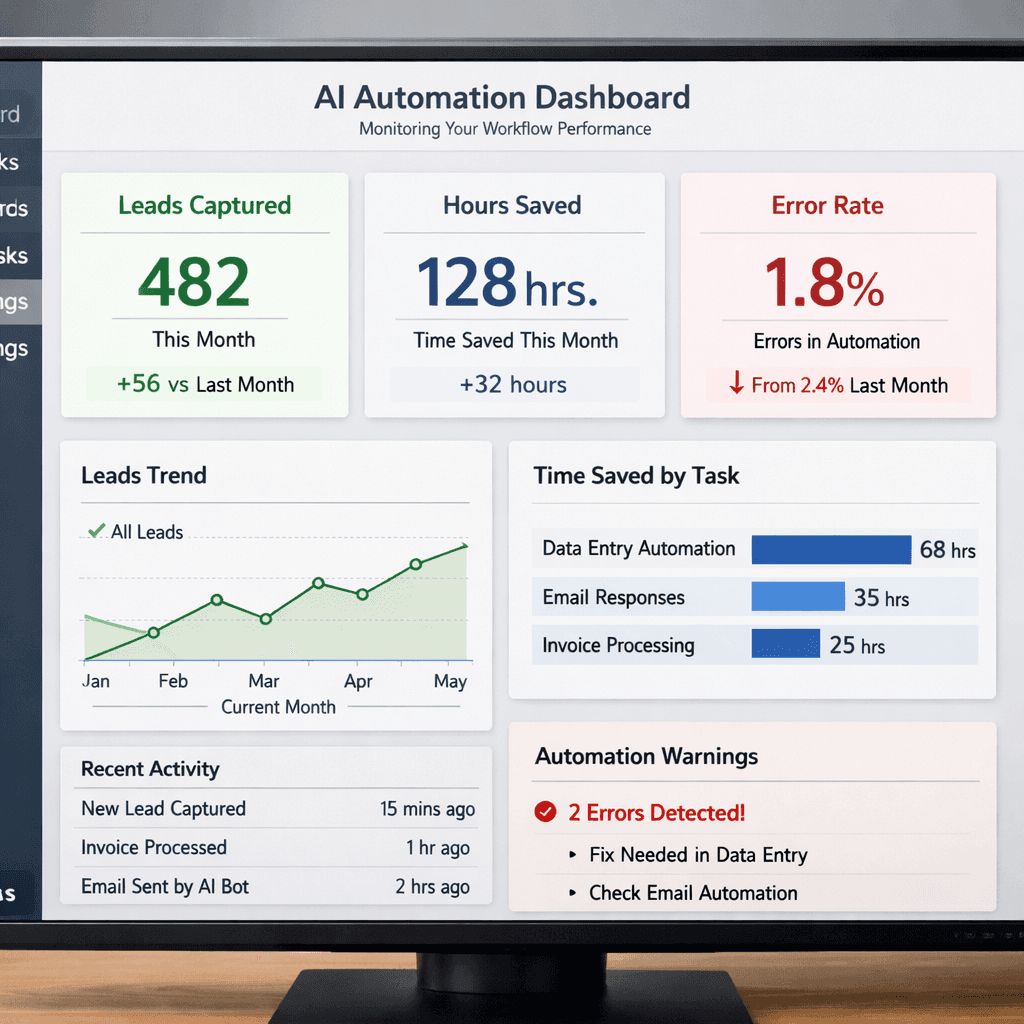
Start with a simple dashboard. Track how many leads were captured, how many emails were sent, and how much time was saved each week. Success.com warns that many small firms overlook hidden costs like setup time and training.Success on AI tool ROIshows a clear formula for total first‑year cost versus saved hours.
Next, run a monthly audit. Look for actions that never fire, or steps that always fail. If a condition never triggers, maybe the rule is too narrow. Adjust and re‑test.
When you see stable performance, think about scaling. Add new triggers for other parts of the business, like a “new order” trigger that sends a fulfillment notification to the kitchen, or a “payment received” trigger that updates the accounting ledger.
For businesses already on Microsoft 365, Power Automate offers AI Builder that can extract data from scanned receipts.Salesforce on AI for small businessnotes that 53% of small firms already use AI, and the biggest wins come from automating repetitive tasks.
Keep an eye on cost. Remember the research finding that free tiers often hide limited AI. As you add more actions, you may cross a usage threshold that bumps you into a paid plan. Use the ROI calculator from Success.com to check if the extra spend still pays off.
Finally, involve your team. Ask them where the workflow feels clunky. Their feedback will point you to the next optimization. When the system runs smoothly, you’ll notice fewer missed opportunities, more repeat customers, and a team that can focus on growth instead of grunt work.
Conclusion
AI automation for small business is a practical path to more time, lower costs, and steady growth. We started with a data‑driven look at the market, then walked through five steps: spot the repeat tasks, pick the right tool, wire it up, launch a simple workflow, and keep improving. By following this playbook you’ll move from scattered spreadsheets to a smooth, self‑running system.
Remember, the biggest mistake is chasing shiny features without a clear problem to solve. Focus on the tasks that cost you the most time, use a tool that gives you true AI depth, like our pick, BCJ Managed AI Workflow Automation, and watch the results add up.
If you’re ready to stop juggling and start automating, start your free trial with Better Call Jerem today. We’ll handle the heavy lifting so you can keep building your business.
FAQ
What is the first step to start AI automation for small business?
Begin by listing every routine task your team does each week. Rank them by how often they occur and how much time they take. Choose the highest‑scoring tasks as your first automation pilots. This focus ensures you get the biggest time savings early on.
Do I need a developer to set up AI automation?
No. Many platforms, like Make and Missive, offer drag‑and‑drop builders that let you create flows without code. If you need custom AI agents, our BCJ service can handle the setup while you stay hands‑off.
How much does AI automation really cost?
Beyond the subscription fee, add setup hours, training time, and any lost productivity while you learn the tool. Success.com breaks down a typical first‑year cost and shows that hidden expenses can be 2‑3× the headline price. Use an ROI calculator to compare total cost against saved hours.
Can AI automation work with the tools I already use?
Yes. Most platforms connect to Google Workspace, Microsoft 365, CRM systems, and payment processors. Power Automate shines for Microsoft stacks, while Make covers a broader app list. Our BCJ solution integrates with the same tools you already rely on.
How do I know if my AI automation is delivering value?
Set up a simple dashboard that tracks key metrics: number of leads captured, emails sent, hours saved, and error rate. Compare these numbers to the baseline before automation. If you see a steady rise in saved hours and a drop in manual errors, you’re getting ROI.
What should I do if an automation fails?
Check the platform’s logs to see where the data stopped. Fix the mapping or adjust a condition, then re‑run a test. Most tools let you pause a flow, edit it, and resume without losing data.
Is AI automation safe for sensitive data?
Choose platforms that offer encryption, role‑based access, and audit logs. Power Automate and BCJ both provide enterprise‑grade security. Always review the provider’s compliance certifications before loading customer data.
When is the right time to scale my automation?
Scale once your core workflows run without errors for at least a month and you’ve measured clear time savings. Then add new triggers for other parts of the business, like inventory alerts or payroll processing, and keep monitoring ROI.